
Odoo and PrestaShop connect through a connector: a module installed in Odoo, and sometimes in PrestaShop, that synchronizes products, stock, orders, and customers via the PrestaShop Webservice API. No connector works on Odoo Online: Odoo.sh or a server is required. The other option is to migrate the store to Odoo eCommerce.
This guide helps an e-commerce merchant choose between connecting and migrating. It compares solutions, provides the actual cost, and the method to migrate without losing SEO. At Nuprod, an Odoo Silver Partner integrator in Gironde, we wrote it based on our e-commerce projects.
Updated on November 3, 2026.
To remember
- Two paths: keep PrestaShop as a storefront and connect it to Odoo, or migrate the store to Odoo eCommerce.
- Connectors go through the PrestaShop Webservice API, with an API key.
- Odoo Online does not accept third-party modules. Any connector, including ours, requires Odoo.sh or a server, thus the Custom plan: €35.90 excluding VAT per user per month for the first year.
- Not all connectors synchronize both ways: some only import orders.
- Nuprod has developed its own custom PrestaShop connector, already used by several of our clients.
- A migration to Odoo eCommerce is prepared with a 301 redirect per product page, otherwise the acquired SEO is lost.
Connect or migrate: how to choose?
Connect PrestaShop to Odoo if your store relies on PrestaShop modules that you do not want to lose. Migrate to Odoo eCommerce if you want a single tool to maintain, or if you are on Odoo Online and want to stay there.
Your situation | Prefer to connect | Prefer to migrate |
|---|---|---|
Specific PrestaShop modules (configurator, marketplace, loyalty) | You care about them and they have no equivalent in Odoo | You use few of them |
Odoo hosting | Odoo.sh or your server | Odoo Online, where no connector is installed |
Marketing team | Used to the PrestaShop back office | Ready to work in Odoo |
Physical store and shared stock | Stock synchronized by the connector | Cash register, stock, and store in the same database |
Maintenance | Two tools and one connector to update with each version | One single tool |
Acquired SEO | Nothing changes on the URL side | A redirection plan to prepare, item by item |
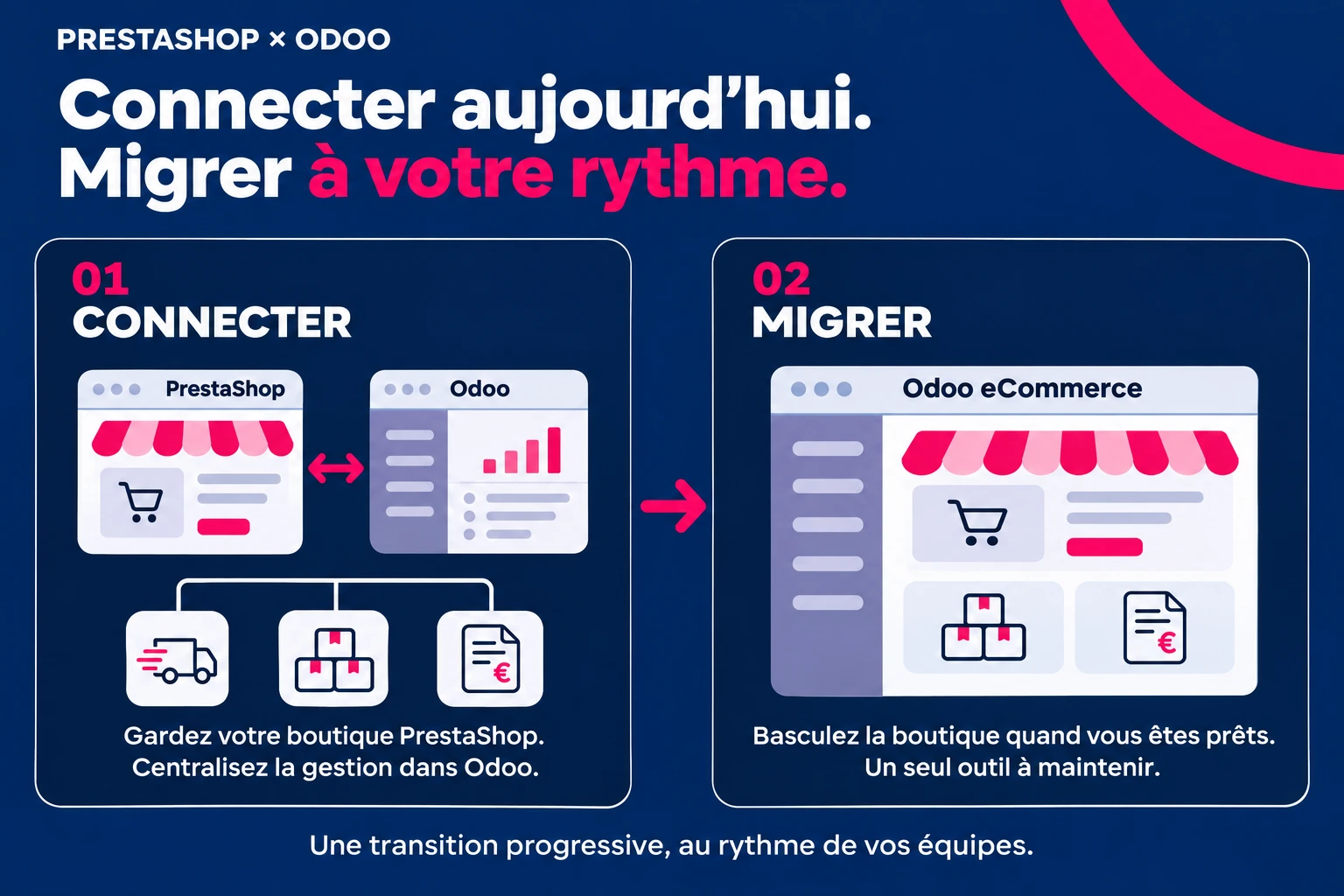
A gradual path also exists: first connect, to centralize orders, stock, and invoices in Odoo without touching the store, then migrate the storefront when the teams are comfortable with Odoo.
The three ways to connect Odoo and PrestaShop
There is no PrestaShop connector in the standard Odoo applications. Three families of solutions share the market.
Solution | Examples | Advantages | Limitations |
|---|---|---|---|
Odoo App Store Connector | VentorTech (PrestaShop 1.6 to 9, Odoo 16 to 19), Webkul (PrestaShop 1.7 to 9, Odoo up to 20, listed at $199), Emipro, SDLC Corp | Ready to use, maintained by its publisher | The direction of the flows varies from one connector to another: Emipro's only imports orders |
Integration platform | Alumio | Configurable flows, multiple tools connected in one place | One more subscription and some setup to do |
Open source connector or development | The OCA connector, the one published by Metrodyn, a custom development | No license, or a connector tailored for your flows | Maintenance is your responsibility. The latest version of the OCA targets Odoo 14 |
Our PrestaShop connector, developed at Nuprod
We developed our own PrestaShop connector, which we adapt to the flows of each store. Several of our clients are already using it to connect their PrestaShop store to their Odoo database. Like market connectors, it installs on Odoo.sh or on your server, with the Custom plan. To find out if it suits your store and hosting, request an audit of your site.
Six questions to ask before choosing a connector:
- Which versions of Odoo and PrestaShop are supported, including the next one?
- In which direction does each data flow: products, stock, orders, customers, statuses?
- Are the combinations and specific prices included?
- Can multiple stores be linked to a single Odoo database?
- Do we need to install a module on the PrestaShop side, or is the API sufficient?
- Who provides support, and within what timeframe?
The blocking point: Odoo hosting, and what it costs
Odoo Online, Odoo's standard hosting, does not accept any third-party modules. All PrestaShop connectors specify this: they are installed on Odoo.sh or on your own server. However, both of these hosting options require the Custom plan, not the Standard plan.
Position | What needs to be planned |
|---|---|
Odoo License | Custom Plan: €35.90 excluding tax per user per month for the first year, then €44.90 |
Hosting | Odoo.sh, billed separately, or your server |
Connector | Its license, for example, $199 displayed for the one from Webkul, and its renewal |
Implementation | The configuration of flows, data matching, testing |
Maintenance | An update of the connector with each new version of Odoo or PrestaShop |
For 5 users, the Custom license costs €2,154 excluding tax for the first year, compared to €1,194 for the Standard plan: €960 more, before hosting and the connector. Calculation based on annual billing, on Odoo's pricing grid from October 2026. The details are in our articleHow much does an Odoo project cost in 2026?
Conversely, Odoo eCommerce works on Odoo Online, with the Standard plan. For an SME without specific development, this is often the argument that sways the decision towards migration.
What synchronizes, and in which direction
The principle: a single source of truth per data. The stock is managed in Odoo, orders are created in PrestaShop, and each product has a master tool.
Data | In PrestaShop | In Odoo | Most common direction |
|---|---|---|---|
Products | Products | Products | From the master tool, to be chosen at the start |
Variations | Combinations | Variants | Like the products |
Price per customer | Specific prices, customer groups | Price lists | Depending on the connector, sometimes in both directions |
Stock | Quantities | Stock | From Odoo to PrestaShop |
Orders | Orders | Sales orders | From PrestaShop to Odoo |
Customers | Customers | Contacts | From PrestaShop to Odoo |
Tracking | Order statuses | Delivery, invoice | From Odoo to PrestaShop |
Delivery | Carriers | Delivery methods | To match once |
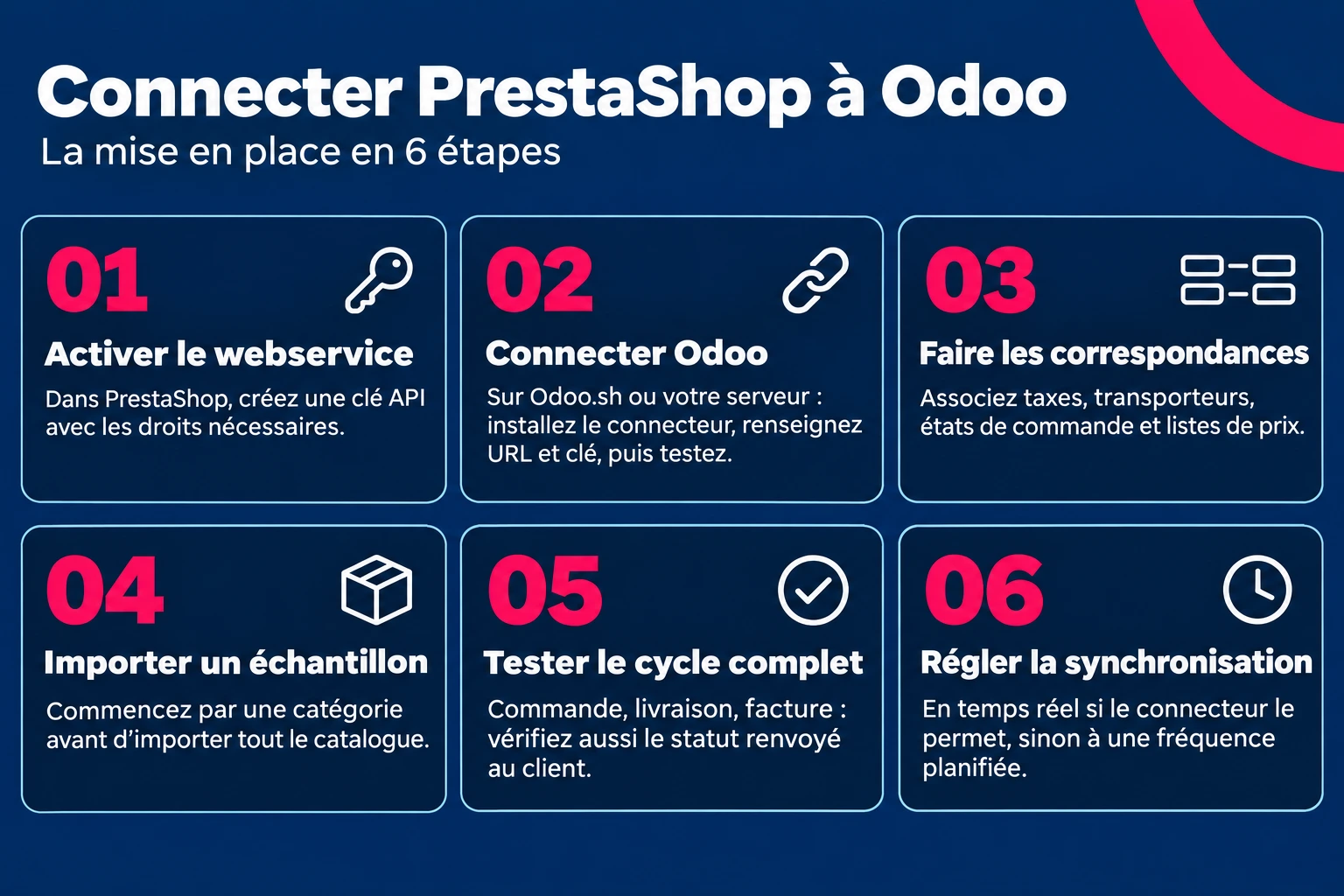
The setup, in six steps
- In PrestaShop, activate the web service and create an API key with the necessary rights, in the advanced settings.
- In Odoo, install the connector on Odoo.sh or your server, enter the store URL and the key, then test the connection.
- Match the taxes, carriers, order statuses, and price lists.
- Import a sample, a category for example, before the complete catalog.
- Test a complete cycle : an order on the store, its delivery and its invoice in Odoo, then the status returned to the customer.
- Set the frequency : real-time when the connector allows it, otherwise a scheduled synchronization.
Once the orders are in Odoo, the carrier labels can also be generated there: that is the role of nuDelivery, our module compatible with Odoo Online.
Migrate from PrestaShop to Odoo eCommerce without losing its SEO
A successful migration retains the positions gained on Google. It all depends on the addresses: PrestaShop and Odoo do not build their URLs in the same way, and each old address must lead to the new one.
- List the URLs to keep. Export the indexed pages from the Search Console and the sitemap of PrestaShop. Identify those that receive traffic or links.
- Retrieve the data. Products, combinations that have become variants, categories, customers, and the order history if you need it. A connector can be used only once, for the import.
- Establish the address mapping. A PrestaShop record of the type /category/123-product-name.html becomes an Odoo record of the type /shop/product-name-45. A two-column table is sufficient: old address, new address.
- Create the 301 redirects in Odoo, Website menu ‣ Configuration ‣ Rewrites. The rules are created one by one, or by importing a file for a large catalog.
- Take back the SEO content : title tags, meta descriptions, product sheet texts, and alternative texts for images.
- After the switch, declare the new sitemap in the Search Console, monitor 404 errors in the Pages report, and track your positions for six to eight weeks.
The SEO settings of Odoo are detailed in our Odoo Website guide.
Five mistakes that cause an Odoo PrestaShop project to fail
Error | Consequence | Best practice |
|---|---|---|
Choose a connector without checking Odoo's hosting | Impossible to install on Odoo Online | Validate the plan and hosting above all |
Leave two master tools for the same data | Duplicates, incorrect stocks, inconsistent prices | One single source of truth per data |
Test with simple products only | Variants and specific prices not properly retrieved | Test with your variant products and your customer prices |
Migrate without a redirection plan | Pages with 404 errors, lost positions on Google | One 301 redirect per product sheet and per category |
Update Odoo or PrestaShop without checking the connector | Synchronization interrupted overnight | Check compatibility before each update, for example to Odoo 20 or PrestaShop 9 |
Frequently asked questions
Can we connect Odoo and PrestaShop?
Yes, with a connector that goes through the PrestaShop Webservice API. It synchronizes products, stock, orders, and customers. It installs on Odoo.sh or on your server, not on Odoo Online.
Is there an official Odoo PrestaShop connector?
No, not among the standard Odoo applications. Connectors are published by third-party vendors on the Odoo app store, such as VentorTech, Webkul, Emipro, or SDLC Corp, or open source by the OCA. At Nuprod, we have also developed our own custom connector, already used by several of our clients.
Does the PrestaShop connector work on Odoo Online?
No. Odoo Online does not accept third-party modules. You need to switch to Odoo.sh or a server, with the Custom plan.
Can Odoo replace PrestaShop?
Yes, with Odoo eCommerce: catalog, variants, price lists, payment and delivery, linked to stock and accounting, on Odoo Online. Keep PrestaShop if your store relies on modules without equivalents in Odoo.
How much does an Odoo PrestaShop integration cost?
You need to account for the Odoo license for the Custom plan, Odoo.sh hosting or a server, the connector license, and the setup of the flows. The total depends on the number of users and the complexity of the catalog.
Can multiple PrestaShop stores be linked to a single Odoo?
Yes, most connectors manage multiple stores per Odoo database, with a common or warehouse-distributed stock.
How to migrate from PrestaShop to Odoo without losing SEO?
List the indexed URLs, match old and new addresses, and then create a 301 redirect for each product sheet and each category. Also take back the titles and descriptions.
Connect today, migrate tomorrow?
Keeping PrestaShop and linking it to Odoo protects your modules and your SEO, but requires Odoo.sh or a server, and a connector to maintain. Migrating to Odoo eCommerce brings together the store, inventory, and accounting in one tool, on Odoo Online, provided that you prepare the redirects.
At Nuprod, Odoo Silver Partner integrator in Gironde, we support e-merchants in both cases: connecting with our own PrestaShop connector, already in place with several clients, or complete migration, with data recovery and a redirect plan.
Request a demo with an expert →
Request an audit of your store →