
A restaurateur looking for an online booking solution quickly finds themselves facing three separate tools: a CMS for the site, an external booking platform, and a cash register that does not communicate with either. Odoo brings these three components together around a single foundation: the Restaurant Point of Sale (POS) module, connected to the site and online booking. The customer reserves or orders from the web page, and the table or ticket appears in real-time in the kitchen and dining area, without re-entry.
This guide details the necessary modules and how a restaurant builds this complete chain, from the POS to the showcase site.
The necessary Odoo modules for a connected restaurant
A restaurant site project relies on four modules, with only one serving as the foundation:
| Module | Role |
|---|---|
| Restaurant Point of Sale (POS) | Core of the system: floor plan, order taking, kitchen tickets, payment processing, inventory management |
| Website | Showcase site, menu page, booking page |
| eCommerce | Online ordering for takeout or delivery, connected to the same product sheets as the POS |
| CRM | Tracking requests for privatization and events |
The Restaurant POS is not just one option among others: it manages the floor plan, kitchen tickets, and inventory on a daily basis. The Website, eCommerce, and CRM modules connect to it, but do not replace it. A restaurant that does not yet have an Odoo POS must start with this module before considering the website or online reservations.
Why restaurateurs are looking for a single solution
Most restaurants accumulate tools over time. A provider builds the website. An external reservation platform manages the tables, often with a commission per cover. A cash register software processes payments in the dining room, disconnected from the rest.
This accumulation creates three concrete problems. The manager updates the menu in three different places. Online reservations do not always appear in the floor plan in real-time, leading to double bookings during peak hours. Online takeout orders have no connection to the kitchen inventory, so there are no alerts when a dish is no longer available.
A restaurateur looking for a restaurant reservation software generally asks the same underlying question: can we avoid paying for a tool by function, with a different commission each time? With an Odoo POS connected to the site, the answer lies in a single subscription, with no commission per reservation or per order.
Key features, from the POS to the website
The Restaurant POS: floor plan, kitchen tickets, and inventory
The POS manages the floor plan, taking orders in the dining room, sending tickets to the kitchen, and decrementing stock with each sale. It is the database that the website and online ordering consult, never the other way around. Choosing the right cash register equipment determines the fluidity of service: our article on the Elo cash register equipment details the terminals compatible with the Restaurant POS, and our article on the Yavin card terminal covers the processing of card payments directly connected to Odoo.
A showcase site that manages the dining room
The Website module builds the essential pages of a restaurant without a developer: home, menu, photo gallery, hours, contact. The menu displayed online comes directly from the products registered in the POS. A price change or daily special updates in one place.
Online reservation, connected to the floor plan
The reservation button on the site opens a calendar linked to the tables and the time slots actually available in the POS. A confirmed online reservation appears in the room schedule used by the team, with the number of covers and the time.
Online ordering, connected to stock
For takeout or delivery, the eCommerce module publishes the menu with the same product sheets as the POS. An order placed online creates a ticket that goes directly to the kitchen, and the stock of tracked ingredients decrements at the same rate as a sale in the dining room.
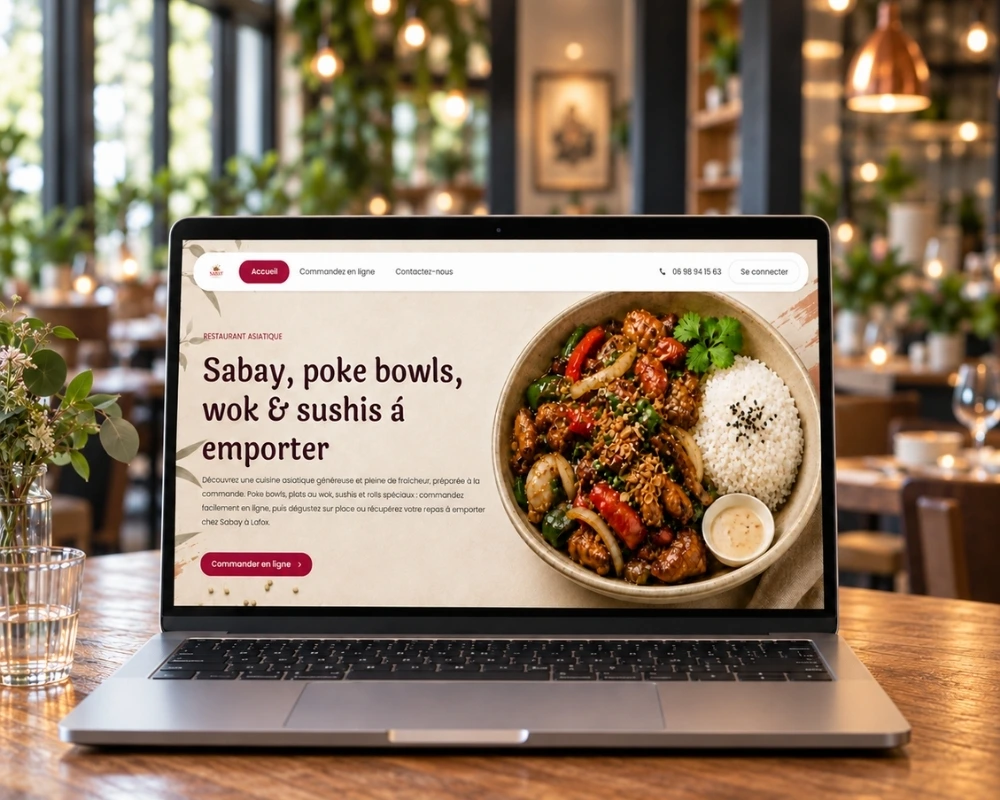
Client case: Sabay, poke bowls, wok & sushi to go
Sabay is a takeout restaurant, specializing in poke bowls, woks, and sushi. The project is based on two connected components: a showcase site presenting the restaurant and the menu, and a self-service ordering point accessible directly from the site, without going through a third-party platform.
On Google natural search, the site is already capturing traffic on its brand queries: 86 clicks on "sabay lafox" and 36 clicks on "sushi lafox" (Search Console).
With separate tools or with Odoo: what it changes
| Without Odoo | With Odoo |
|---|---|
| Site, reservation, and cash register on three separate tools | Site, reservation, and cash register in a single database, around the POS |
| Menu to be updated in several places | Unique menu, entered once in the POS |
| Commission per reservation or per online order | Single subscription, no commission per transaction |
| Online reservations to be manually checked against the schedule | Reservations integrated directly into the POS floor plan |
| Kitchen stock disconnected from online sales | Stock automatically decremented with each order, in-house as well as online |
How to set up online reservation and ordering with Odoo
Step 1: configure the menu in the Restaurant POS. Each dish, drink, and composed menu is created once, with its price and availability. This record then feeds the site and online orders without re-entry.
Step 2: build the site pages. A simple structure is enough: home, menu, reservation, contact. The theme is customizable with the restaurant's colors and photos, without code.
Step 3: activate online reservation. The restaurant defines its time slots, its capacity per service, and its cancellation policies. The reservation calendar connects to the POS floor plan.
Step 4: activate online ordering for takeout or delivery. The eCommerce menu includes the product sheets from the POS. The restaurant chooses the opening hours for orders and the delivery areas covered, if applicable.
Step 5: publish content regularly. A blog post about a seasonal dish or an upcoming event attracts qualified traffic and gives the site a reason to return, beyond just making a reservation.
Does a restaurant website rank correctly on Google?
Yes, as long as local SEO is treated as a priority, not an option. A restaurant is primarily referenced by its geographical location and its reviews, before its content.
The Website module manages Title and Meta Description tags, custom URLs, and structured data expected for an establishment (address, hours, type of cuisine). These technical elements matter, but the most important factor remains the consistency between the site, the Google Business Profile listing, and the customer reviews displayed on both. A restaurant that keeps its menu, hours, and contact information identical everywhere gains trust from Google and customers who compare multiple addresses before making a reservation.
FAQ: Odoo for restaurant online reservation and ordering
What Odoo modules are necessary for a restaurant?
The Restaurant POS is the central module: floor plan, kitchen tickets, inventory, and payment. The site (Website), online ordering (eCommerce), and group request tracking (CRM) connect to it, but do not function without it.
Can an external reservation platform be replaced by Odoo?
Yes. The Website module integrates a reservation system connected to the POS floor plan, with no commission per cover or separate subscription.
Is online ordering really connected to the cash register and inventory?
Yes. An order placed online creates a ticket in the kitchen and decrements the stock of tracked ingredients, just like an order taken in the dining area on the POS.
Is a developer needed to set up online reservations?
No, in most cases. The visual editor of the Website module allows you to build pages and the reservation calendar without code. A developer becomes useful for specific needs: integration with a third-party cash register system or advanced automations.
Is the site suitable for local SEO?
Yes. The module manages essential SEO tags, but the results mainly depend on the consistency of information between the site, the Google Business Profile, and the reviews published on both platforms.
One restaurant, one system for the POS, the site, and reservations.
A restaurant that manages its site, reservations, and online ordering on three separate tools spends time circulating information that should already be shared. With Odoo, the POS remains the foundation, and the site, reservation agenda, and online ordering connect to it, without re-entry.
To go further on the hardware:
- Which cash register equipment to choose with Elo for your Restaurant POS
- Process your payments with the Yavin card terminal connected to Odoo
Do you have a website project for your restaurant?
Book a call with a Nuprod expert, and let's discuss your establishment, your current cash register equipment, and your online booking goals.