
GPAO, or computer-assisted production management, plans and tracks manufacturing: bill of materials, production orders, workstations, component needs. In Odoo, it's the Manufacturing application, linked to sales, purchases, inventory, and accounting: a customer order can trigger the production order and the purchase of components.
This guide is aimed at leaders of industrial SMEs who are comparing specialized MRP software and an ERP like Odoo. At Nuprod, an Odoo Silver Partner integrator in Gironde, we wrote it based on our industrial projects: connection to CAD software, adapting Odoo for a cooperage, references in manufacturing and maintenance. Updated on November 3, 2026.
Updated on November 3, 2026.
To remember
- GPAO plans and tracks production. The ERP manages the entire company, including GPAO. The MES controls the workshop in real-time.
- Odoo's Manufacturing application manages bill of materials (multi-level, variants, kits), production and work orders, workstations, master production schedule, subcontracting, batches, and serial numbers.
- Several advanced functions are part of the Enterprise edition: the master production schedule, the Workshop application on tablet, Quality, and PLM.
- Odoo 20 adds continuous production, a workshop schedule in Kanban and Gantt, and bill of materials comparison.
- Since Odoo 20, an operator who works only in the workshop can have a Light User license for €7.90 per month.
- Industries that control machines in real-time often add an MES alongside the ERP.
GPAO, MRP, ERP, MES: what are we talking about?
Four acronyms recur in every industrial project. They refer to areas that partially overlap.
Term | What it is | What it covers | In Odoo |
|---|---|---|---|
MRP | Computer-Aided Production Management | BOMs, routings, manufacturing orders, planning, production tracking | The Manufacturing application |
MRP | Calculation of component requirements (Material Requirements Planning), extended to capacity (MRP II) | What needs to be purchased or manufactured, and when, based on orders and forecasts | Replenishment rules and the master production schedule |
ERP | Integrated management software | The entire company: sales, purchases, inventory, accounting, human resources, and MRP | Odoo as a whole |
MES | Manufacturing Execution System | The workshop in real-time: machine tracking, time spent, traceability, quality controls | Partially: the Workshop application and device connectivity with Odoo's IoT |
A specialized MRP goes far in production, but it needs to be connected through interfaces to sales, purchases, and accounting. In Odoo, manufacturing shares the same database as the rest of the company: a manufacturing order consumes stock, feeds costs, and appears in accounting without export.
What does Odoo's MRP do?
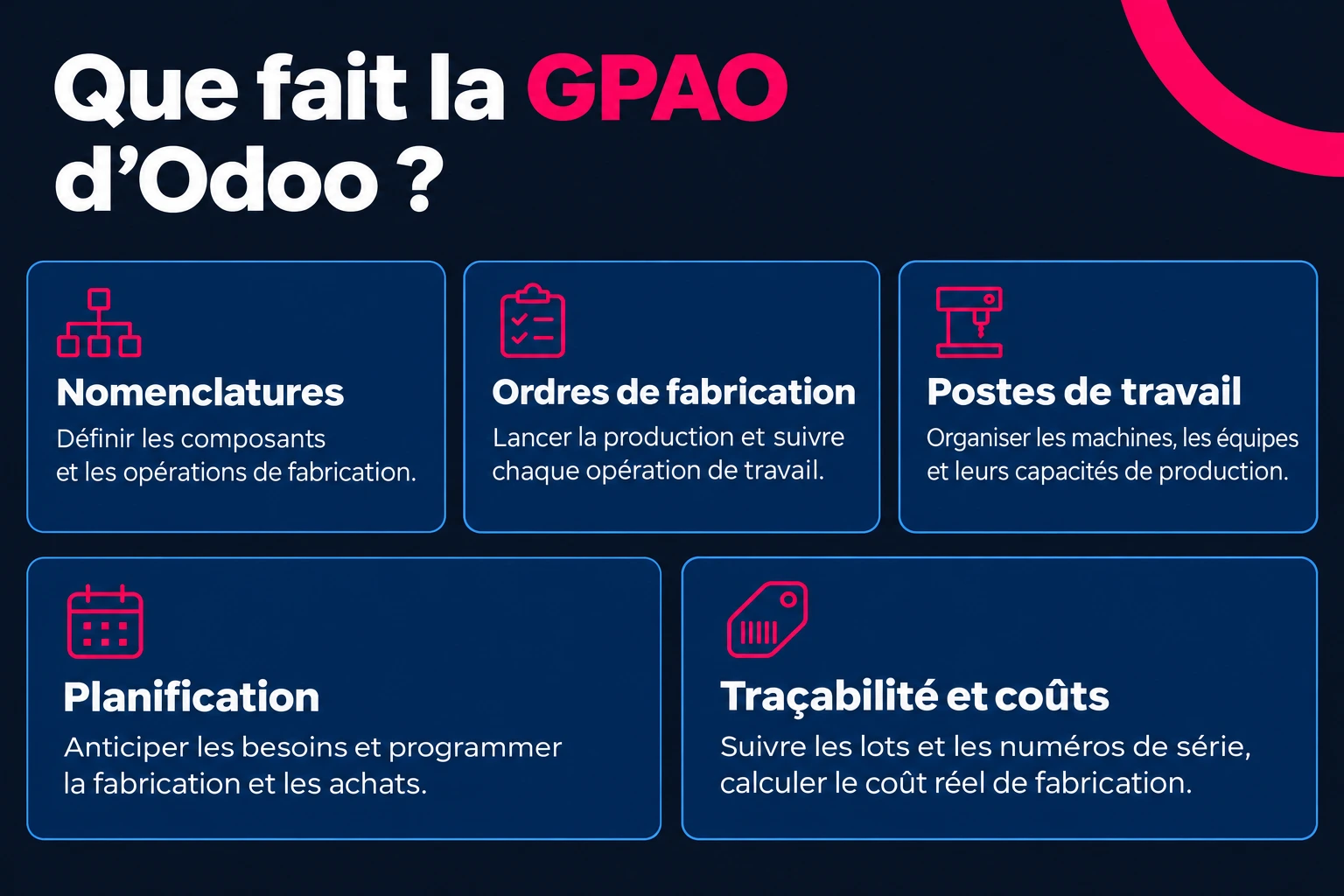
Odoo's Manufacturing application is used to schedule, plan, and process manufacturing orders. It consists of five components.
The BOMs
A bill of materials lists the components and operations necessary to manufacture a product. Odoo manages multi-level bills of materials (a subset within a set), product variants, kits sold in parts, and subcontracting bills of materials. It is created from the product sheet, with the Bills of Materials button, and the preview calculates the cost price based on the cost of the components.
Manufacturing orders and work orders
The manufacturing order triggers the production of a given quantity: it reserves the components, consumes them, and enters the finished product into stock. If the Work Orders option is enabled, each operation in the bill of materials becomes a work order at a workstation. Odoo also manages scrap, backorders, splitting and merging orders, by-products, and disassembly.
Workstations
A workstation is a machine, a line, or a team, with its capacity, hourly cost, and closure days. Work orders are scheduled there, and dependencies set the order of operations.
Planning
The master production plan starts from sales forecasts and inventory to propose what to manufacture and what to purchase, period by period. Replenishment rules trigger manufacturing orders and purchases when stock falls below a threshold, or with each customer order for made-to-order manufacturing.
Traceability and costs
Lots and serial numbers track each component to the finished product. Odoo calculates the actual cost of each manufacturing order and the value of work in progress. Manufacturing can occur in one, two, or three steps, depending on whether components are taken and finished products are stored in separate locations.
What Odoo 20 changes for manufacturing
Odoo 20, presented on September 24, 2026, at the Odoo Experience in Brussels, does not add a new manufacturing engine. It mainly changes scheduling and work in the workshop.
New features of Odoo 20 | What it changes |
|---|---|
Continuous production | Quantities are declared on work orders. If the option is enabled on the bill of materials, the next operation starts as soon as parts are ready, without waiting for the previous one to finish. |
Workshop scheduling in Kanban | Manufacturing orders are grouped by week, with the status of components, the active station, and the remaining time on each card. |
Gantt chart of work orders | Drag-and-drop scheduling, by station or by employee, with automatic date recalculation. |
Barcode workshop | The operator scans their badge, then the manufacturing order, and controls their operations at the reader. Scanning a station displays its screen. |
Comparison of bills of materials | Two bills of materials side by side, and the list of products that use a given component. |
Instructions in the bill of materials | Each step can become a quality control point: photo, label, compliant or not, measurement. |
Quality rate by supplier | The percentage of successful checks, visible on the supplier's sheet and on the purchase order. |
Planned cost versus actual cost | The cost variance per manufacturing order. |
PLM | A unique report of all changes to a bill of materials and their cost. |
Odoo 20 also brings everyday actions: splitting an ongoing order to produce the rest later, putting a validated order back into draft, and a common Produce button for Manufacturing, Workshop, and Barcodes.
For an existing database, these new features require a migration to Odoo 20. If your workshop interacts with machines or a MES via the API, have these connections checked: Odoo 20 schedules the end of the old XML-RPC and JSON-RPC interfaces.
From order to delivery: the manufacturing flow in Odoo
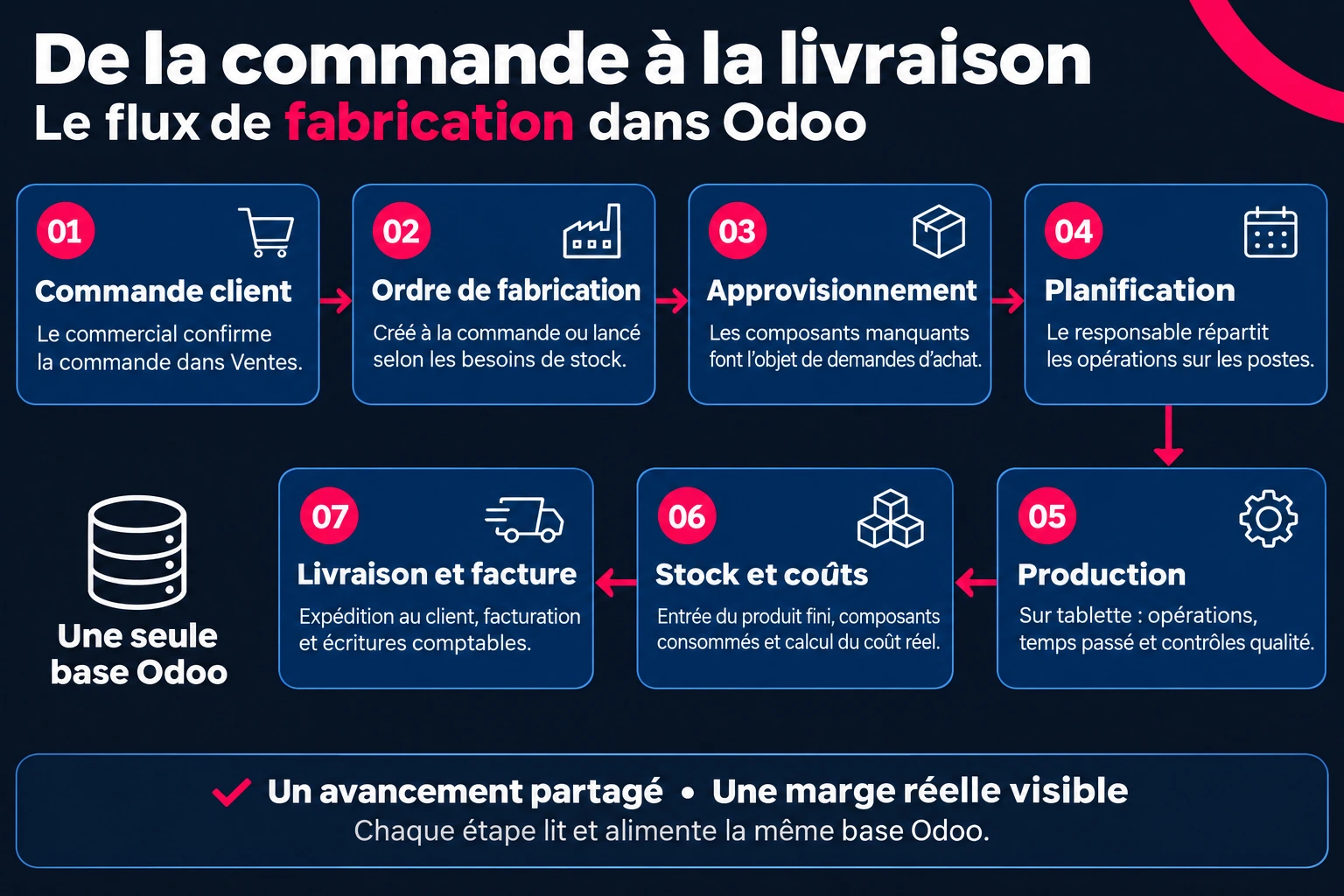
In a small to medium-sized enterprise that manufactures on demand, the flow follows seven steps, all within the same database:
- The sales representative confirms a customer order in Sales.
- If the product is made to order, Odoo creates the manufacturing order. For stock production, a replenishment rule or the master production schedule triggers it.
- Missing components lead to purchase requests from suppliers.
- The production manager schedules work orders on the stations.
- In the workshop, operators start and finish operations on tablets, with the time spent. Quality controls are displayed at the right moment.
- The finished product enters stock, components exit, and Odoo calculates the actual cost of the order.
- The delivery goes to the customer, the invoice follows, and accounting records the entries.
Each step reads and feeds the same database. The sales representative sees the progress of the manufacturing order from the order, and the manager sees the actual margin without reconciling two software systems.
The applications that complement manufacturing
Odoo's MRP relies on other applications from the same base. They are added according to the needs of the workshop.
Application | What it is used for |
|---|---|
Workshop | The operators' interface on tablet: start, track and complete operations, record time spent |
Quality | Control points integrated into operations, quality alerts triggered from the workstation |
Maintenance | Preventive and corrective maintenance of equipment, also triggered from the workshop |
PLM | Technical modifications: bill of materials versions, change requests, validations |
Subcontracting | Suppliers who manufacture for you, with the sending of components and tracking of returns |
Inventory and Barcodes | The stock of components and finished products, scanning of movements |
IoT | The connection of workshop devices, such as a scale or a measuring instrument |
Workshop, Quality, PLM, and the master production plan are part of the Enterprise edition. Since Odoo 20, an operator who only works in the Workshop can have a Light User license for €7.90 per month: the complete calculation is in our article on the price of Odoo in 2026.
What Odoo does not do alone: CAD
Odoo does not natively read the plans from your design software. We have connected Odoo to SolidWorks and TopSolid: DXF and PDF plans are imported, and bills of materials are created in Odoo from CAD. A 3D viewer that we have integrated also displays STEP plans directly in Odoo.
Does Odoo suit your production?
Odoo is suitable for SMEs that manufacture from defined bill of materials, on demand or from stock. It requires a more in-depth study for continuous flow process industries, or for workshops that control their machines in real time.
Type of production | Is Odoo suitable? |
|---|---|
Make to order, small and medium series (metalworking, woodworking, assembly) | Yes: this is the most common case |
Manufacturing from stock, repetitive series | Yes, with replenishment rules and the master production plan |
Configurable products, many variants | Yes, with bills of materials by variant |
Outsourcing part of the operations | Yes, with outsourcing bills of materials |
Process industry: recipes, dosages, continuous flow | Partially: bills of materials and batches are suitable, process control often requires a dedicated tool |
Highly automated workshop, real-time machine data | Odoo for management, with an MES or IoT developments for the machines |
Our industry experience
We have 15 years of experience in the industry. Our profile in the Odoo directory includes 13 references in manufacturing and maintenance (October 2026), including Industrial Sharpening of Gironde. Among our achievements: adapting Odoo to the business of a cooperage, connecting to CAD software SolidWorks and TopSolid, and a 3D viewer for STEP plans. The details are on our page Are you an industrialist?
Deploying Odoo's MRP in an SME: the method
- Make the master data reliable. Articles, units of measure, bill of materials, and component costs: the cost calculated by Odoo depends on these figures.
- Start simple. Bill of materials and production orders first. Activate the posts and work orders when the basic flow is running.
- Set up real times. Measure the operation times in the workshop rather than using theoretical times: the planning depends on it.
- Test end-to-end. On a test basis, move a real product from order to delivery, with its component purchases.
- Train by role. Operators on the Workshop, the workshop manager on planning, buyers on replenishment.
Four mistakes to avoid
Mistake | Consequence | Good practice |
|---|---|---|
Reusing bills of materials without checking them | Incorrect costs and component needs | Validate them with the workshop before import |
Activate everything at startup | A workshop overwhelmed with new entries | Deploy in stages |
Keep theoretical lead times | A schedule that doesn't hold | Measure real times |
Leave CAD disconnected | Bills of materials entered twice | Connect or import from CAD |
Frequently asked questions
What is MRP?
Computer-assisted production management. It plans and tracks manufacturing: bills of materials, routings, production orders, workstations, and component requirements.
What is the difference between a PPS and an ERP?
The PPS covers production. The ERP covers the entire company, including production: sales, purchases, inventory, accounting, human resources. In Odoo, the PPS is the Manufacturing application of the ERP.
Is Odoo a good PPS for a small business?
For a small business that manufactures from bills of materials, to order or from stock, yes: bills of materials, production orders, workstations, planning, and subcontracting are covered, linked to sales and accounting. Continuous flow process industries require a case-by-case study.
What is a production order?
The document that initiates the production of a quantity of finished product. It reserves and consumes the components of the bill of materials, records the time spent, and brings the finished product into inventory.
Is manufacturing available in Odoo Community?
Yes, essentially: bills of materials and production orders. The master production plan, the Workshop application, Quality, and PLM are part of the Enterprise edition.
What are the new features of Odoo 20 for manufacturing?
Continuous production, which launches the next operation as soon as parts are ready, a workshop schedule in Kanban and Gantt, workshop management via barcode, comparison of bills of materials, and a quality rate by supplier.
Can Odoo connect to CAD software?
Not natively. We developed the connection of Odoo to SolidWorks and TopSolid, to import the plans and create the bills of materials from CAD.
A production management system connected to the rest of the company
With Odoo, production no longer exists in a separate software: orders, manufacturing orders, purchases, inventory, and accounting share the same database. For an industrial SME, the choice hinges on the quality of the bills of materials, timing, and phased deployment.
At Nuprod, Odoo Silver Partner integrator in Gironde, we support industrial SMEs, from the recovery of bills of materials to the connection with CAD. The free audit starts from your workshop: your products, your workstations, and your flows.