
Are you using Odoo and looking for a payment terminal to process your customers? Or are you already equipped with Yavin terminals and want to connect your payments to Odoo? The partnership Nuprod × Yavin brings these two environments closer together to offer merchants and restaurateurs a more integrated payment process.
In a restaurant or a store, card payment often represents the last step of a much larger process: taking orders or creating sales, calculating amounts, processing payments, validating transactions, and then tracking activity.
When the payment terminal operates independently of the cash register software, a break occurs in this process. The seller or server must report the amount from the cash register to the payment terminal, verify the payment result, and then continue the transaction in their software.
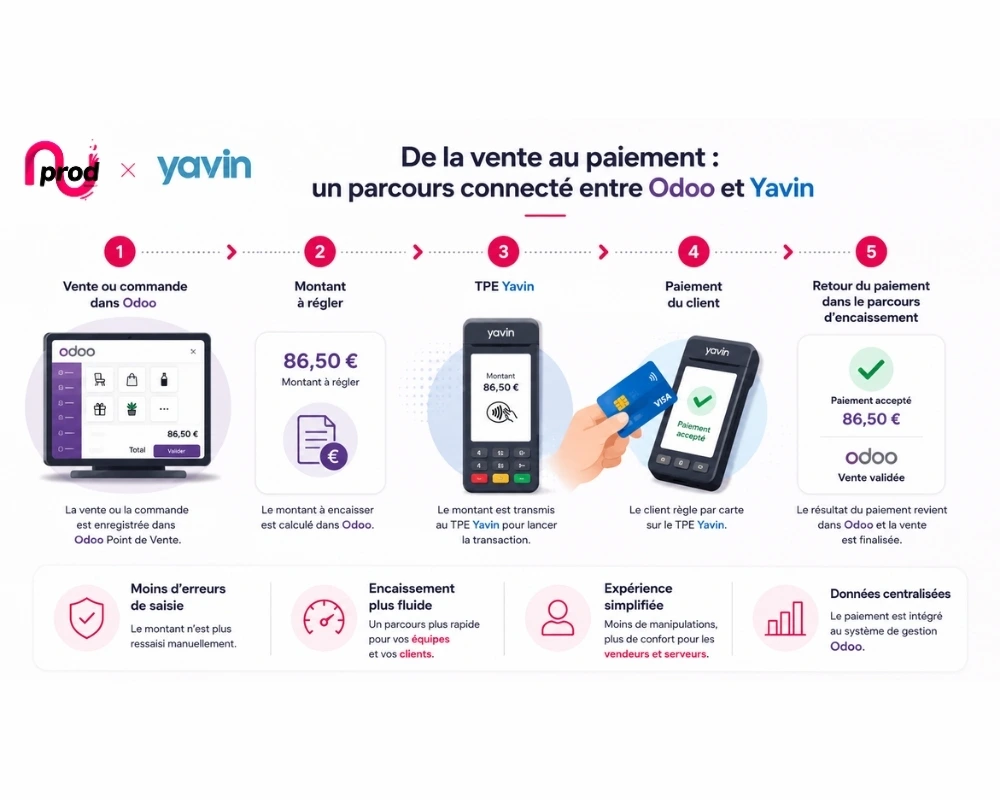
Connecting a Yavin payment terminal to Odoo allows payment to communicate with the Point of Sale. The goal is simple: the amount recorded in Odoo is transmitted to the Yavin terminal, the customer pays by card, and the payment result returns to the payment process.
For a restaurateur or merchant, this connection helps limit re-entries, reduce the risk of errors, and streamline the checkout process, while keeping Odoo as the central management environment.
This is precisely the goal of the partnership Nuprod × Yavin : combine Nuprod's Odoo expertise with Yavin's payment solutions to better connect sales, payment, and management.
In this guide, we will see how a Yavin payment terminal works with Odoo, what benefits this integration can bring to a restaurant or a business, how a payment process works, and what elements to check before implementing the solution.
To remember
A Yavin payment terminal can be integrated into an Odoo environment to enable communication between the payment terminal and the Point of Sale. For restaurants and businesses, the goal is to eliminate manual re-entry of amounts, streamline payments, and better integrate payments into the management system. The partnership Nuprod × Yavin aims to provide this connection between the two environments.
Yavin payment terminal and Odoo: how does connected payment work?
The principle is quite simple.
Odoo Point of Sale manages sales: products, orders, prices, customers, payment methods, and transaction validation. Odoo POS is designed for both stores and restaurants and includes integration of payment terminals.
Yavin handles card payments. Its documentation offers several APIs that allow a cash register software to initiate a transaction on a Yavin X terminal. Yavin notably provides a Cloud API, a local API, and an Android Intent integration depending on the technical environment.
The integration Nuprod × Yavin allows these two functions to be brought together:
Sale or order in Odoo → amount to be paid → Yavin terminal → customer payment → payment return in the checkout process.
Let's take a bill of €86.50 in a restaurant.
With an independent terminal, the server may need to check the amount in their cash register, enter €86.50 on the terminal, have the customer pay, and then verify the result before finalizing the sale.
With a Yavin terminal connected to Odoo, the goal is to eliminate this re-entry: the amount already calculated in Odoo is sent to the terminal to trigger the payment.
| Step | Independent terminal | Yavin terminal connected to Odoo |
|---|---|---|
| Sale or order | Cash register software | Odoo |
| Amount calculation | Cash register software | Odoo |
| Entry on the terminal | Manual | Sent by integration |
| Payment | Terminal | Yavin terminal |
| Payment return | Often manual control | Return via integration |
| Finalization | Multiple manipulations | More integrated process |
Why connect a Yavin terminal to Odoo?
The customer continues to pay with their card as before. It is mainly the operations performed by the seller or server that are simplified.
Fewer re-entries and cashing errors
A sale shows €64.90, but €69.40 is entered by mistake on the terminal: a few reversed digits are enough to create a discrepancy.
By transmitting the amount from Odoo to the card terminal, we eliminate this re-entry from the process.
This becomes particularly relevant when payments are processed quickly.
A smoother checkout process
At noon in a full restaurant or on a Saturday afternoon in a shop, each additional action slightly slows down the checkout.
The employee can stay longer in their sales process instead of manually recreating the transaction on a second device.
The principle is therefore:
Odoo manages the sale. Yavin processes the payment. The Nuprod × Yavin integration allows the two to communicate.
A payment more integrated into management
The advantage of Odoo is also not to limit the information system to the checkout.
Point of Sale can fit into an environment that includes other management functions. Odoo also documents POS features specific to stores and restaurants, as well as tools for analyzing orders and sessions.
Payment thus becomes a step in the sales journey rather than a completely isolated operation.
Are you already using Yavin? Connect your card terminals to Odoo
The partnership Nuprod × Yavin is also aimed at merchants and restaurateurs who already have Yavin terminals.
In this case, your question is probably not:
"Which card terminal should I buy?"
But rather:
« How can I better connect my cash receipts to the rest of my business? »
The APIs provided by Yavin allow third-party cash solutions to interact with its terminals, particularly to initiate payments.
This allows considering Odoo as a cash system and, depending on the company's needs, as a broader management environment.
Yavin TPE and Odoo for a restaurant
In the restaurant industry, payment comes after several operations: taking orders, assigning to a table, preparation, bill, and then payment.
Odoo Point of Sale has functions specific to restaurants, particularly for managing rooms and tables, orders, bills, and certain payment processes.
The association with Yavin allows for a continuous process:
Odoo Order → bill → payment request → Yavin TPE → validation.
For a server, the benefit is very concrete: reducing back-and-forth between the cash software and the terminal, especially during peak times.
This approach can suit independent restaurants, bars, cafes, restaurant groups, or establishments with multiple cash registers, provided there is a configuration adapted to their organization.
Yavin TPE and Odoo for a business
A shop must also manage much more than just payment: products, sales, customers, inventory, or multiple locations depending on its activity.
For a merchant already equipped with Yavin, switching to Odoo can therefore allow for the integration of the Point of Sale into a broader management environment, while considering the preservation of its existing payment environment.
This can particularly concern shops, showrooms, specialty stores, or retail networks.
The goal is not to change ERP simply because one uses Yavin. However, if the current cash register software no longer meets the company's needs, compatibility with existing payment terminals becomes an important criterion in a migration project to Odoo..
Do you already use Odoo? Yavin becomes an option for your payments.
The reasoning also works the other way around.
Your restaurant or business already uses Odoo Point of Sale, but you are looking for a payment solution.
Odoo 19 documents several providers with terminal integrations directly offered in its POS. To date, Yavin is not on this documented list.
It is therefore important not to present Yavin as a standard native integration of Odoo.
This is precisely where the partnership Nuprod × Yavin comes in: to offer a specific integration between Yavin's payment technologies and the Odoo environment.
To choose your solution, several elements must be considered:
- restaurant or business;
- fixed or mobile payment;
- number of cash registers;
- number of terminals;
- number of establishments;
- version and configuration of Odoo;
- available network ;
- actual organization of teams.
The best choice is therefore not simply the payment terminal with the most features, but the one that integrates properly into your payment process.
How to set up Yavin with Odoo ?
The integration should start with an analysis of the existing setup, not with the installation of hardware.
1. Identify your starting point
Two main scenarios exist :
You have Odoo : you need to analyze your Point of Sale, your version, your registers, and your current payment methods.
You have Yavin : you need to inventory your terminals and analyze your current cash register software as well as the processes you might want to transfer to Odoo.
2. Map the payments
Next, you need to understand how your teams actually work.
How many registers? How many payment terminals? Payment at the counter or at the table? One or multiple establishments? Multiple collaborators per terminal?
This step helps determine the appropriate architecture.
3. Configure the Nuprod × Yavin integration
Nuprod operates in the Odoo environment and its integration with Yavin. The chosen communication method depends particularly on the technical context; Yavin documents several integration modes suitable for different cash scenarios.
The user-side objective remains simple: trigger the payment from the sales process, make the payment on Yavin, and retrieve the result.
4. Test before deployment
A payment project must be tested in real situations: payment accepted, payment refused, cancellation, transaction chaining, multiple payment terminals, or connection issues depending on the functions covered by the integration.
This step is particularly important in a restaurant or a business where the system must remain efficient during peak hours.
Odoo + Yavin for multiple restaurants or stores
The reconciliation between payment and ERP becomes even more interesting for a company with multiple establishments.
Each restaurant or shop must process payments locally, while management may wish to centralize its information and control further.
In this context, the project must be thought out around the entire architecture: points of sale → cash registers → Yavin payment terminals → sales → Odoo management.
Odoo can also manage different hardware and peripherals associated with the Point of Sale, allowing the POS environment to be designed as a whole rather than just a simple cash register.
For a network, this upstream thinking prevents the accumulation of independent solutions as new establishments open.
FAQ on Yavin, payment terminals, and Odoo
Can a Yavin payment terminal be connected to Odoo?
Yes, a Yavin payment terminal can be connected to an Odoo environment through a specific integration. Yavin provides APIs that allow cash register software to initiate transactions on its terminals. The Nuprod × Yavin partnership aims to ensure this connection with the Odoo environment.
Is Yavin natively compatible with Odoo Point of Sale?
Yavin is not currently listed among the terminal providers in the documentation for native integrations of Odoo 19. The Nuprod × Yavin solution is therefore based on a dedicated integration, and not on Odoo's native standard connector.
How to connect Yavin to Odoo?
First, it is necessary to analyze the version and configuration of Odoo, the Yavin terminals, the number of registers, and the payment process. The integration can then be configured and tested before being used in production.
Can Yavin be used with Odoo in a restaurant?
Yes, provided that there is a suitable integration and configuration. Odoo Point of Sale offers features designed for the restaurant industry, while Yavin can handle payment on terminal.
Can a Yavin card terminal be used with Odoo in a store?
Yes. The goal is to connect Yavin payment to the sales process carried out in Odoo Point of Sale. The exact scope depends on the organization of the store and its technical environment.
I already use Yavin: do I need to change my card terminals to switch to Odoo?
Not necessarily. One of the goals of the Nuprod × Yavin partnership is precisely to study the integration between Yavin terminals and Odoo. However, the possibility of retaining an existing fleet must be verified according to the hardware and project configuration.
Which card terminal to choose with Odoo?
The choice depends on the country, the activity, the necessary mobility, the number of registers, the payment provider, and the desired level of integration. Odoo documents several native integrations; Yavin represents an additional option within the integration proposed with Nuprod.
Is Odoo Point of Sale suitable for restaurants and businesses?
Yes. Odoo states that its Point of Sale application is designed for stores and restaurants, with specific features depending on the type of activity.
Nuprod × Yavin: connect payment, cash register, and management
The partnership Nuprod × Yavin ultimately addresses two needs.
Are you using Odoo? You might consider Yavin to connect your physical transactions to your Point of Sale environment through a dedicated integration.
Are you already using Yavin? You can explore Odoo to evolve your cash register and, if your needs justify it, centralize more management processes without automatically considering your payment terminals as equipment to be replaced.
For a restaurant or a business, the goal remains the same: to avoid stacking independent tools and build a coherent journey between sales, payment, and management.
Is your Odoo or Yavin setup compatible?
Nuprod can analyze your current environment, your cash registers, your terminals, and your organization to determine the relevant configuration.
👉 Schedule an appointment with a Nuprod expert to study your Odoo × Yavin project
The goal of the first exchange: to determine if the integration truly meets your needs and identify the most relevant configuration for your restaurant or business.