
Configuring a carrier in Odoo starts in the e-commerce site settings: delivery methods, pricing rules, coverage areas. But the real question comes next: how to connect this configuration to a real carrier account to generate a label, display a real rate at checkout, and track a package? This is where most e-commerce merchants on Odoo get stuck, especially on Odoo Online, where installing third-party modules is not possible.
nuDelivery addresses this blockage: a carrier widget in your checkout, a shipping back office, and a connection to Odoo via XML-RPC that works without a module to install, on Odoo Online, Odoo.sh, and on-premise.
To remember :
The native configuration of carriers in Odoo stops at the creation of delivery methods. The actual connection to a carrier requires a module, which cannot be installed on Odoo Online.NuDelivery circumvents this limitation via XML-RPC, without IT service providers or server configuration, and covers Chronopost, Colissimo, Mondial Relay, Relais Colis, UPS, FedEx, DHL, and TNT. Checkout widget, one-click labels, rate synchronized with the order. €60/month excluding VAT, 14-day free trial without credit card.
What is the configuration of carriers in Odoo?
The configuration of carriers in Odoo involves defining, in the Sales or Website module, the delivery methods offered to your customers: carrier name, geographical area covered, pricing calculation rule (weight, cart amount, flat rate). This step remains native and accessible from the Odoo interface, without development.
What the native configuration does not cover is the actual connection to the carrier account: generating a shipping label, retrieving an exact rate at the time of payment, tracking the package until delivery. This connection requires an integration module, which most market modules cannot do on Odoo Online.
Why the native configuration quickly shows its limits
The Odoo Online blockage
Odoo Online does not allow the installation of third-party modules. However, almost all delivery connectors available on the Odoo Apps Store operate via modules. They become unusable if you are hosted by Odoo itself, which is the case for the majority of SMEs. There are then two options: migrate to Odoo.sh or on-premise to be able to install a module, or do without integration and do everything manually.
Even with a module, the experience remains limited
On Odoo.sh or on-premise, an integration module remains installable, but the official modules are often incomplete, with heavy maintenance and outdated ergonomics. The native checkout widget of Odoo, on its side, cannot display multiple carriers with their actual prices in the same place: without this choice, some customers abandon at the time of payment, each purchasing profile having its own logic between pickup points, home delivery, or express.
The hidden cost of manual re-entry
Without a real connection to the carrier, each order requires copying the address into the carrier's portal, generating the label separately, and then returning to Odoo to update the status. Multiplied by twenty or fifty orders per week, these are lost minutes on each shipment, spread across multiple tabs, multiple labels, and multiple pickups.
nuDelivery: the solution that works on all Odoo hosting

nuDelivery connects Odoo to a carrier without going through a module. The connection is made via XML-RPC: nuDelivery detects your Odoo instance, checks the fields already present, and automatically creates the missing ones. No module to upload, no SSH access, no IT service provider to mandate, no server configuration on your side.
You stay on the hosting you have chosen. If you change later, nuDelivery follows the migration without anything to reinstall.
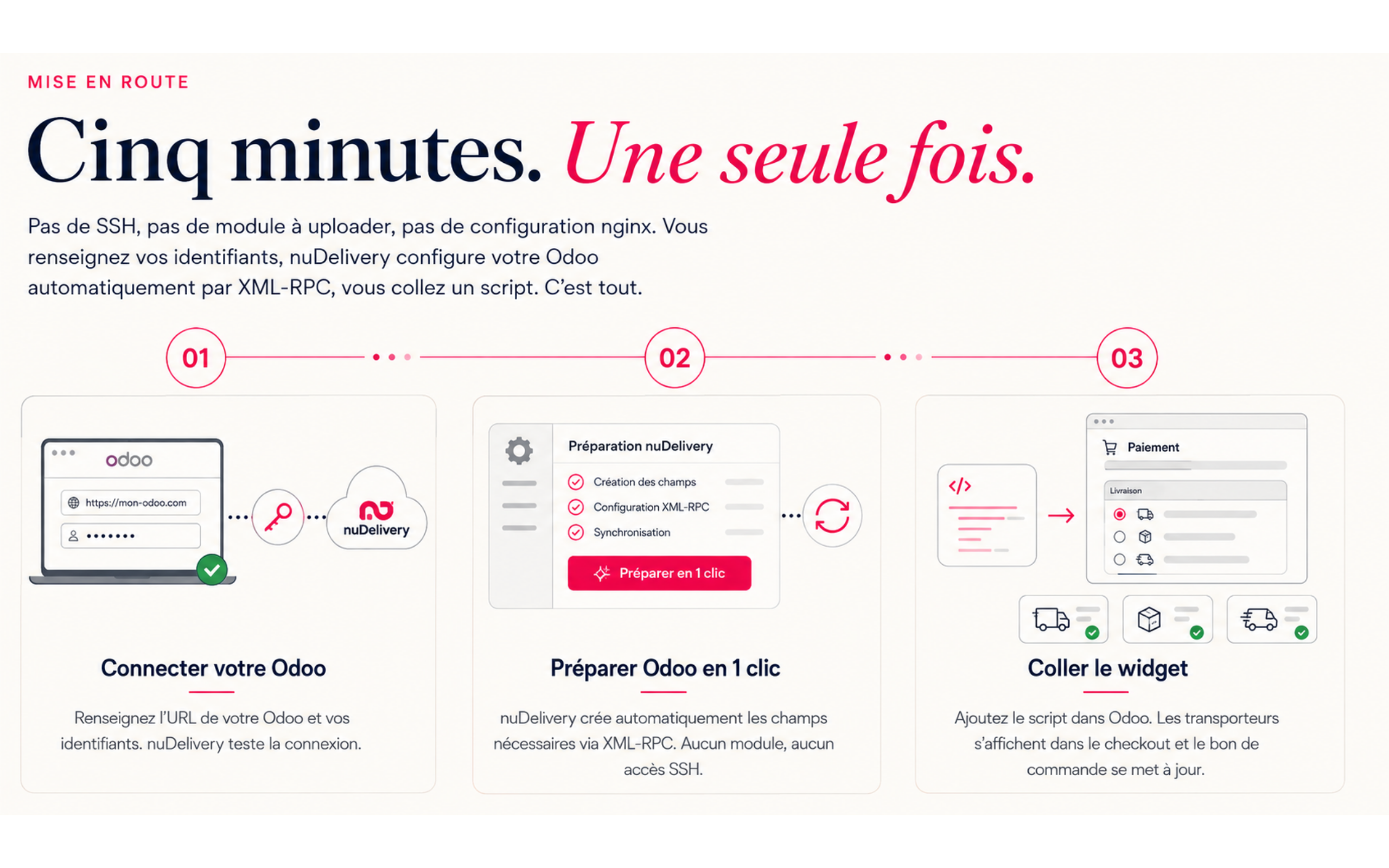
Getting started in 3 steps
- Connect your Odoo: enter the URL of your instance, your username, and your password. nuDelivery tests the connection and starts the 14-day trial, no credit card required.
- Automatically prepare Odoo: nuDelivery creates the necessary custom fields via XML-RPC. No module to upload, no SSH access, compatible with Odoo Online included.
- Paste the widget: a script to insert into the Odoo Website Builder. The checkout immediately displays the carriers, and the purchase order updates automatically.
Comparison: native configuration vs nuDelivery
| Native Odoo configuration | nuDelivery | |
|---|---|---|
| Compatible Odoo Online | No (blocked modules) | Yes |
| Installation | Module to upload | None (XML-RPC connection) |
| Multi-carrier labels | Manual, carrier by carrier | Generated in one click from Odoo |
| Rate displayed at checkout | Generic or fixed | Actual, by carrier |
| Getting started | Development required | A few minutes |
→ Create my free account : 14 days trial, no credit card.
The customer journey: choose your carrier at checkout
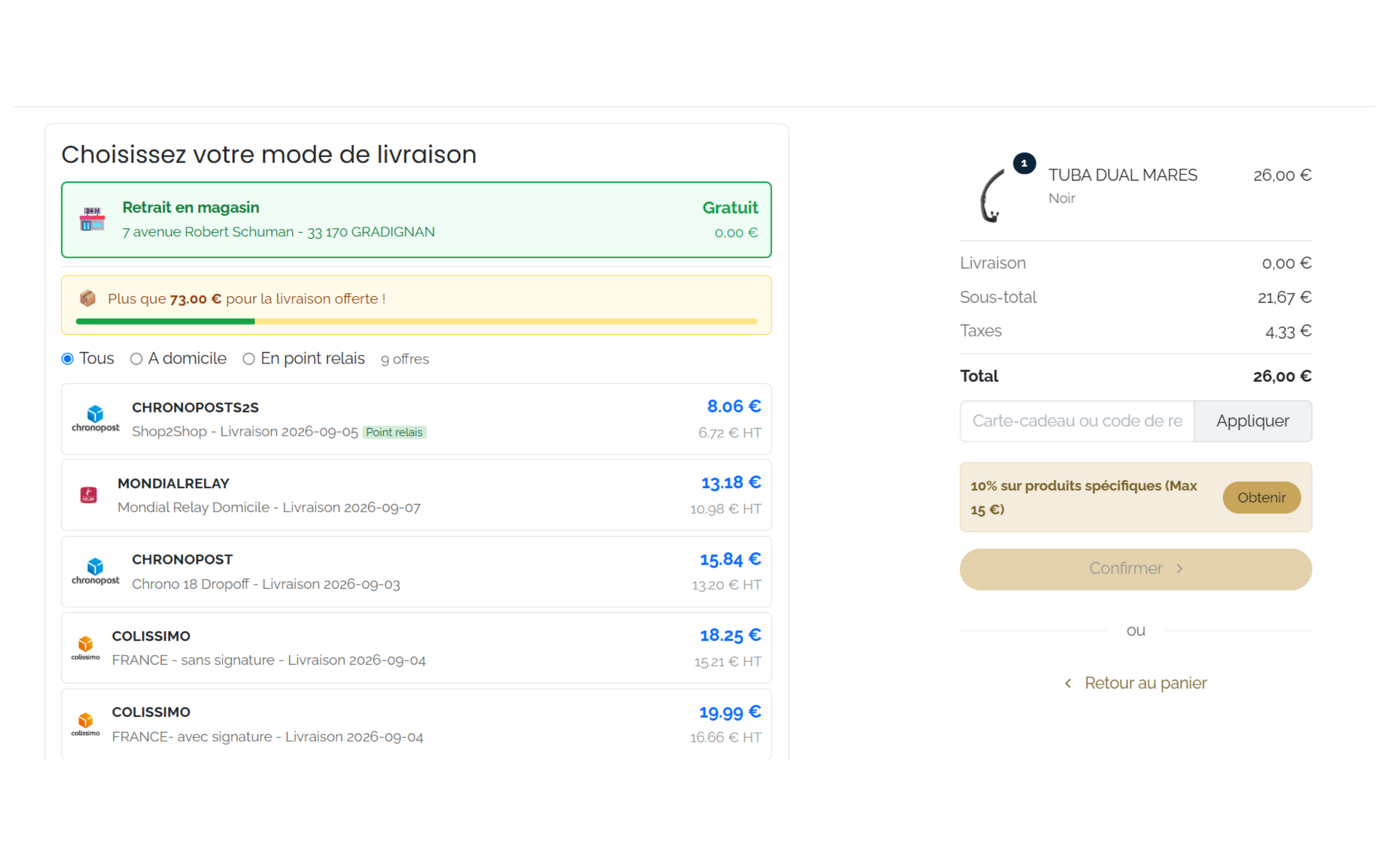
At the time of payment, your customer sees each available carrier with their delivery time and actual rate. In this screenshot: Chronopost S2S at pickup point (€8.06 incl. VAT), Mondial Relay at home (€13.18 incl. VAT), Chronopost Chrono 18 Dropoff (€15.84 incl. VAT). The exact rate then depends on the account negotiated by each e-merchant.
The customer also chooses their pickup point on a map, without leaving the checkout, and your free shipping thresholds are configured once and for all. This choice is made in the Odoo Website Builder, without redirecting to a third-party site.
The rate chosen at checkout is not just a display: the Odoo purchase order is automatically updated with this exact amount, including delivery line and taxes. What your customer sees corresponds to what your accountant sees.
The e-merchant journey: manage your shipments from Odoo
From the Odoo delivery note, the label is generated with one click, in PDF or ZPL format if you already have a thermal printer. The multi-package feature is native: three physical packages yield three distinct labels, without additional handling. Tracking and returns remain visible from Odoo, without going back through the carrier's portal.
For a team that today manages its shipments by juggling between several carrier tabs, the change is first seen here: a single interface, linked to the original order, from the delivery note to the printed label.
→ See nuDelivery in action
Carriers compatible with nuDelivery
Eight carriers are already connected and available at checkout as soon as the account is created:
- Chronopost
- Colissimo
- Mondial Relay
- Relais Colis
- UPS
- FedEx
- DHL
- TNT
Pickup points, home delivery, international express: the three main use cases are covered, which avoids imposing a single delivery method on customers who do not all have the same time or budget constraints.
Rate and free trial
nuDelivery costs €60 per month excluding VAT, with no commitment, and a free 14-day trial without a credit card. This monthly fee covers the service: the transport itself is billed separately by Upela, at the rate negotiated on your account, with no commission per shipment, no percentage taken, no hidden tier.
60€/month is equivalent to two hours of your time, and that's about what you earn each week by stopping the re-entry of your addresses in ten different carrier portals. The subscription includes up to two users. For broader needs (large volumes, extended team, custom on-premise), the nuProd team discusses it on Discord.
→ Create my free account, 14-day trial, no credit card required: [Link to nudelivery.fr]
Support and assistance
nuDelivery is published by Nuprod, Odoo Silver Partner, with over 100 clients already supported. Support is provided through a Discord community rather than by numbered ticket or chatbot: you ask your question, the nuProd team responds in French, within 24 hours, from Bordeaux.
FAQ: configuring carriers in Odoo
How to configure a carrier in Odoo?
Natively, Odoo allows you to create delivery methods and pricing rules from the e-commerce site settings. However, the actual connection to a carrier (labels, tracking, real-time pricing) requires an integration module, which is absent on Odoo Online. nuDelivery replaces this step with an XML-RPC connection, without a module.
Does Odoo Online allow the installation of a carrier delivery module?
No. Odoo Online does not allow the installation of third-party modules, which blocks most traditional delivery connectors. nuDelivery bypasses this limitation with an XML-RPC connection, without a module to upload or SSH access. It is the only method that works equally well on Odoo Online, Odoo.sh, or on-premise.
Which carriers are compatible with nuDelivery?
Chronopost, Colissimo, Mondial Relay, Relais Colis, UPS, FedEx, DHL, and TNT are already connected. Your customers can find them in the choice widget at checkout, with the actual price displayed for each option, from the pickup point to express.
How much does it cost to set up carriers with nuDelivery?
€60 per month excluding tax, with no commitment, and a free 14-day trial without a credit card. Shipping is billed separately by Upela, at the negotiated rate on your account, with no commission per shipment.
Do you need technical skills to connect Odoo to a carrier with nuDelivery?
No. The connection is made by entering your Odoo account credentials: nuDelivery automatically configures the necessary fields via XML-RPC. You just need to paste a script into the Website Builder to display the widget at checkout: no SSH access, no lines of code, no IT service provider to mandate.
In summary
nuDelivery connects Odoo to your carriers without a module, without development, and without depending on your hosting. Odoo Online, Odoo.sh, or on-premise: the XML-RPC connection works the same way everywhere. Your customers choose their carrier at checkout, you generate labels with one click from Odoo, and the purchase order remains synchronized with the actual price.
The trial is free for 14 days, without a credit card. Enough to connect a carrier account, generate a first label, and see the widget displayed at checkout, before deciding if nuDelivery becomes your shipping tool.
→ Create my free account : 14 days trial, no credit card, cancellation at any time.