
Starting from September 1, 2026, all companies subject to VAT will need to be able to receive electronic invoices.
If you are using Odoo 17 or a later version, you generally do not need to invest in an additional platform. You just need to install the French e-Invoicing, finalize your registration from Odoo, and activate your company with the approved platform. Once this step is completed, your electronic invoices will be sent and received directly from your ERP, while Odoo will handle the regulatory exchanges required by the reform.
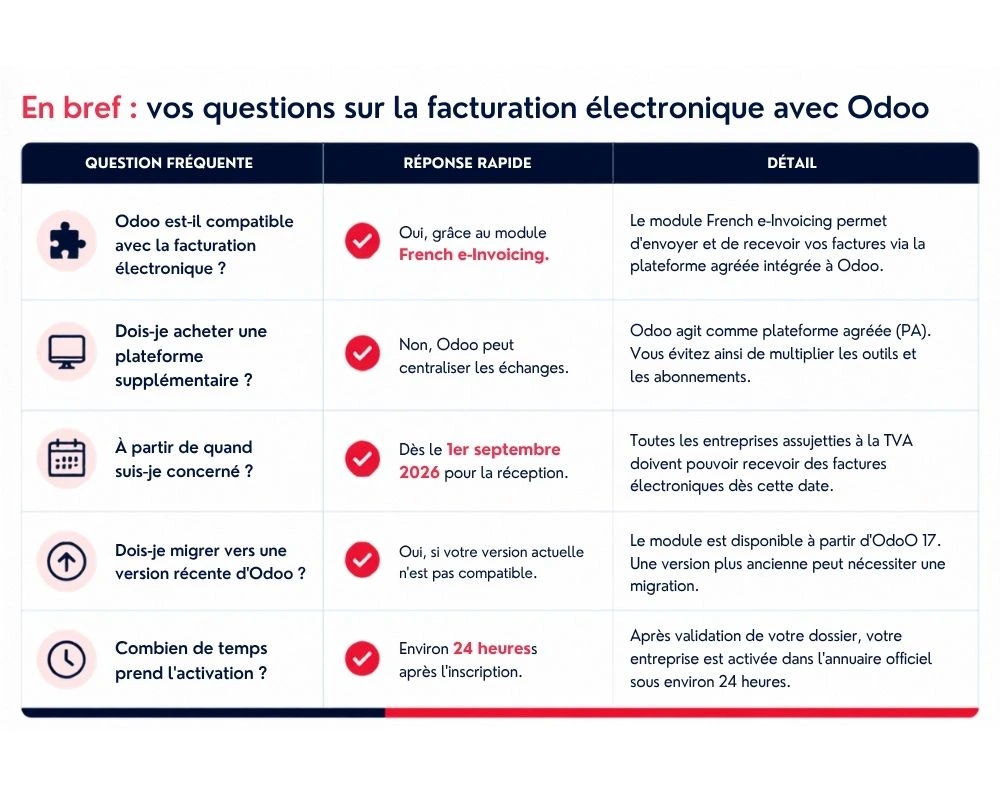
| Key points | |
|---|---|
| 📅 Mandatory reception | September 1, 2026 for all companies subject to VAT |
| 📤 Mandatory issuance | From September 2026 for large companies and mid-sized enterprises, then September 2027 for small and very small enterprises |
| ✅ With Odoo | The French e-Invoicing module allows you to use Odoo as an approved platform |
| ⏱️ Activation time | About 24 hours after registration |
| 🔧 Prerequisites | Use a compatible version of Odoo and install the dedicated module |
Electronic invoicing with Odoo: what changes for businesses in 2026
For several months, electronic invoicing has been at the heart of executives' concerns.
Between new obligations, approved platforms, numerous acronyms (PDP, PA, e-reporting…) and the solutions offered on the market, it is sometimes difficult to know what is truly mandatory.
At Nuprod, one question comes up regularly:
"Should we add an electronic invoicing platform to our Odoo?"
In the majority of cases, the answer is no.
If your company is already using Odoo, you probably have the right foundation. The goal is mainly to activate the features provided by the publisher in order to comply with the new obligations while continuing to work in your ERP.
In other words, this reform should not be seen as new software to deploy, but as an evolution of your Odoo environment.
Who is affected by electronic invoicing in France?
All companies subject to VAT are affected by the reform, regardless of their size.
However, the deadlines differ depending on whether it is about receiving or issuing electronic invoices.
This is an important distinction, as many SMEs mistakenly believe that they are not affected until 2027.
In reality, the ability to receive electronic invoicing becomes mandatory for everyone starting September 2026.
Electronic invoicing schedule: what are the deadlines for SMEs?
Here is the currently planned schedule.
| Company size | Mandatory receipt | Mandatory issuance |
|---|---|---|
| Large companies | September 1, 2026 | September 1, 2026 |
| ETI | September 1, 2026 | September 1, 2026 |
| SME | September 1, 2026 | September 1, 2027 |
| TPE and micro-enterprises | September 1, 2026 | September 1, 2027 |
👉 To remember
Even if your company will only have to issue electronic invoices in 2027, it will need to be able to receive them starting September 1, 2026.
It is precisely this first deadline that justifies preparing your Odoo environment today.
Why the receipt of electronic invoices becomes mandatory starting 2026
This is probably the most misunderstood point of the reform.
Many leaders reason only based on their own issuance deadlines.
However, starting September 2026, large companies and ETIs will begin sending their electronic invoices.
If your company is not properly registered with an approved platform, your suppliers will no longer be able to send you their invoices through the regulatory circuit.
Autrement dit, même si vous n'émettez pas encore de factures électroniques, vous devez être prêt à en recevoir.
Is Odoo compatible with electronic invoicing?
Yes.
And this is probably the best news for companies already equipped with Odoo.
Since the compatible versions, Odoo offers a dedicated application for managing French electronic invoicing.
Once the module French e-Invoicing is installed and your company registered, Odoo becomes the central point for all your invoicing exchanges.
In practical terms :
- your customer invoices are sent via the approved platform ;
- your supplier invoices arrive directly in Odoo ;
- regulatory exchanges are automated ;
- your teams continue to work in their usual ERP.
The goal is simple : integrate compliance into your existing processes, without multiplying tools.
Why Odoo avoids adding an electronic invoicing platform
When new obligations arise, the first reflex is often to look for specialized software.
However, adding a new platform generally involves :
- an additional interface ;
- one more subscription ;
- synchronizations between multiple tools ;
- more maintenance.
With Odoo, the logic is different.
All your management remains centralized in a single environment, which limits re-entries, improves data quality, and simplifies the daily life of teams.
Odoo or external platform: which solution to choose ?
For many SMEs, simplicity is often the best investment.
Here are the main differences.
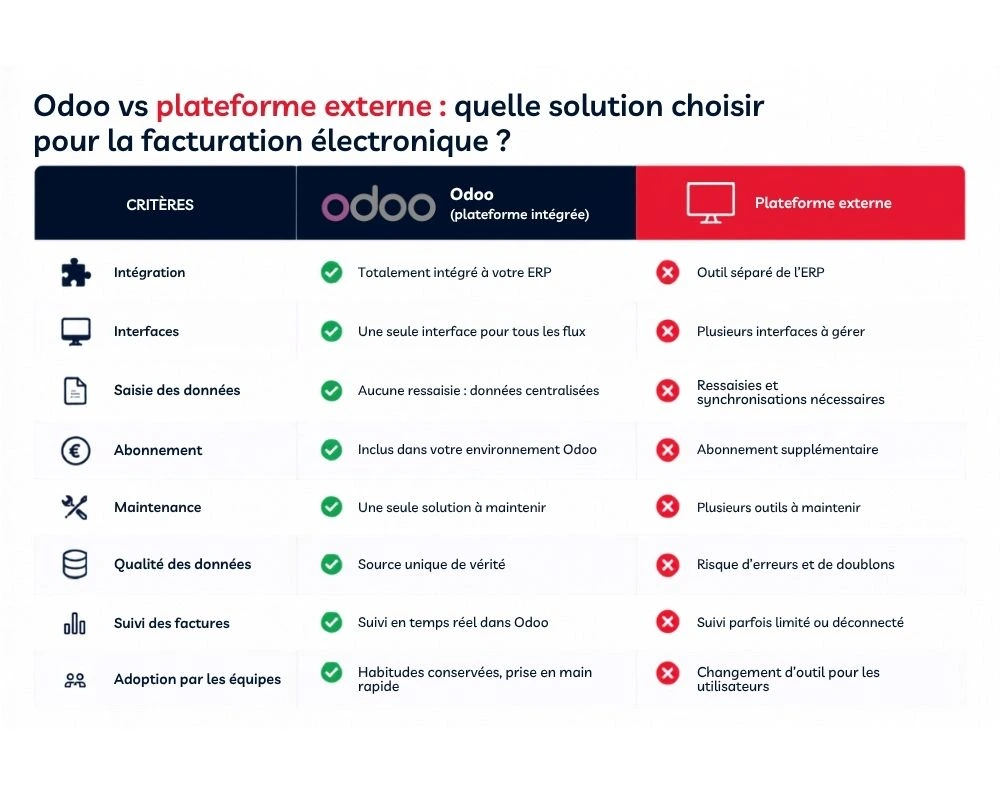
| External platform | Odoo |
|---|---|
| An additional tool to manage | Everything is centralized in your ERP |
| Multiple interfaces | A single interface for users |
| Synchronization between multiple software | A unique database |
| Multiple subscriptions | A single solution to maintain |
| Risks of duplicates | A single source of truth |
For companies already using Odoo, maintaining a single environment generally saves time, limits errors, and facilitates team adoption.
What are the prerequisites before activating electronic invoicing in Odoo?
Before activating the feature, a few checks are recommended.
We particularly advise you to check:
- that your version of Odoo is compatible;
- that the module French e-Invoicing is available;
- that your company's legal information is up to date;
- that your customer and supplier records contain the necessary data.
These few checks generally help avoid difficulties at the time of activation.
Why prepare your Odoo before September 1, 2026?
Compliance is generally simpler than one might think.
However, waiting until the last moment can quickly complicate things.
An Odoo migration, a configuration to adjust, or a registration validation can take several days.
Anticipating means giving yourself time to carry out these checks without disrupting your business.
At Nuprod, we recommend that our clients prepare their environment several weeks before the deadline, in order to approach the return with complete peace of mind.
Specifically, how do you activate electronic invoicing in Odoo?
Once your environment is compatible, the activation of electronic invoicing is done directly from Odoo.
Contrary to what one might think, this is not a complex project. In just a few steps, your company can be registered on the approved platform and ready to receive electronic invoices.
Here is the process to follow.
Step 1: install the module French e-Invoicing
The first step is to install the dedicated application.
From the menu Applications (Apps) :
- , update the list of applications;
- search for French e-Invoicing or PDP ;
- install the module.
💡 Bon à savoir
If you previously installed a module Peppol, this does not necessarily mean that your environment is ready for the French reform. The module to use is indeed French e-Invoicing, designed to meet French requirements.
Step 2: register your company on the approved Odoo platform.
Once the module is installed, go to :
Accounting → Configuration → Settings → French electronic invoicing
You can then start the registration process.
This step officially associates your company with the approved platform used by Odoo.
As with many regulated services, an identity verification (KYC/KYB) will be required to confirm your company's information.
Step 3: wait for your company's activation
After your file is validated, Odoo transmits the necessary information.
Your company is then registered in the official directory used for electronic invoicing.
Generally count about 24 hours before your registration is fully active.
Once this step is completed, your suppliers will automatically be able to identify your company to send you their electronic invoices.
Step 4: start using electronic invoicing in Odoo
Once your registration is validated, no revolution in your daily life.
Your teams simply continue to create their quotes and invoices in Odoo.
The difference is in the background.
The ERP automatically takes care of :
- sending electronic invoices ;
- receiving those from your suppliers ;
- ensuring regulatory exchanges with the approved platform ;
- transmitting the necessary information to the administration when required.
For users, habits remain virtually unchanged.
How does the certified Odoo platform work?
One of the main advantages of Odoo is to maintain a fully integrated operation.
You do not switch applications to send an invoice.
You continue to work in your ERP, while Odoo automatically manages regulatory exchanges.
The operation can be summarized as follows.
| Step | Operation |
|---|---|
| Invoice creation | Your team creates the invoice in Odoo. |
| Control | Odoo checks the necessary information. |
| Transmission | The invoice is sent via the certified platform. |
| Reception | Your client receives the electronic invoice. |
| E-reporting | Regulatory data is transmitted automatically when required. |
For your collaborators, the change is almost invisible.
This is precisely the benefit of an integrated solution: to continue using the same processes while meeting new obligations.
What does electronic invoicing change in your daily life?
Most users imagine they will have to learn a new tool.
In reality, the changes mainly concern certain management rules.
The processes remain largely the same.
Validated invoices can no longer be modified.
A validated electronic invoice can no longer be returned to draft as before.
In case of an error, a credit note must be used or the rules provided by the regulations must be applied.
More reliable data is becoming essential
The reform places greater emphasis on data quality.
Before activation, we particularly recommend checking:
- the SIREN numbers of your clients;
- the contact details of your suppliers;
- the taxes used;
- the products associated with the invoice lines.
This step is often an opportunity to clean the database and improve the overall quality of your ERP.
Supplier invoices arrive directly in Odoo
One of the main benefits is the automation of receipt.
Electronic invoices arrive directly in Odoo, without going through attachments scattered across multiple mailboxes.
Result:
- fewer re-entries;
- less risk of forgetting;
- better tracking of processes;
- smoother accounting.
What are the most common errors during activation?
By supporting companies on their Odoo projects, we regularly encounter the same situations.
| Common error | Consequence | Best practice |
|---|---|---|
| Waiting until the last week before the deadline | Risk of activation delay | Anticipate several weeks in advance |
| Use an incompatible version of Odoo | Unable to install the module | Check your version before any steps |
| Install the wrong module | Incomplete configuration | Use French e-Invoicing |
| Neglect customer data | Blockages during exchanges | Check SIREN and legal information |
| Think that only the issuance is concerned | Reception impossible from 2026 | Also prepare for the reception of invoices |
Odoo Audit: check that your company is ready for electronic invoicing
Most companies do not need to completely review their organization.
However, a few checks can ensure that everything is ready before the deadlines.
At Nuprod, we offer an Odoo compliance audit that allows you to:
- check the compatibility of your version;
- control the technical prerequisites;
- validate the configuration of your environment;
- answer your questions about the reform;
- define any actions to be planned.
Book an Odoo audit with a Nuprod consultant and calmly prepare your transition to electronic invoicing.
Odoo electronic invoicing: answers to questions from SME leaders
The reform of electronic invoicing still raises many questions, particularly among companies already equipped with Odoo.
Should one subscribe to another platform? Is a SME concerned starting in 2026? Is migration mandatory? How long does it take to activate electronic invoicing in Odoo?
Here are the answers to the most frequently asked questions.
Should an external electronic invoicing platform be added to Odoo?
In the majority of cases, no.
When your company uses a compatible version of Odoo and the module French e-Invoicing is correctly installed, electronic invoice exchanges can remain centralized in your ERP.
This way, you avoid:
- adding a new interface;
- multiplying subscriptions;
- synchronizing multiple tools;
- creating new control tasks for your teams;
- scattering accounting data across multiple software.
Odoo then becomes your single entry point to create, send, receive, and track electronic invoices.
For a SME already equipped with the ERP, the challenge is therefore not to choose a new tool, but to verify that the version, module, and settings used are compatible with the French reform.
Should a SME receive electronic invoices starting in September 2026?
Yes.
Even if SMEs, very small enterprises, and micro-enterprises will only have to issue their electronic invoices starting from the September 1, 2027, they must be able to receive them starting from September 1, 2026.
This distinction between reception and emission is essential.
Starting in September 2026, large companies and mid-sized enterprises will be able to start sending their invoices through the new regulatory circuit. A small business must therefore have a correctly registered reception address for these invoices to reach them.
In other words, waiting until 2027 to prepare your Odoo would be a mistake: the obligation to receive applies to all companies subject to VAT a year earlier.
How long does it take to activate electronic invoicing in Odoo?
The installation and configuration of the module are generally quick, but full activation is not limited to just a few clicks.
| Step | Indicative timeframe |
|---|---|
| Checking the version of Odoo | A few minutes |
| Installation of the French e-Invoicing module | About 5 to 10 minutes |
| Configuration and registration | About 15 to 30 minutes |
| KYC/KYB verification | Variable depending on the case |
| Activation in the directory | About 24 hours |
These timeframes remain indicative. They may be longer if legal information is missing, if multiple companies need to be configured, or if a migration is necessary.
That’s why it’s better not to wait until the last days before the deadline.
Should we migrate to Odoo 17, Odoo 18, or Odoo 19?
A migration may be necessary if your database is running on an old version of Odoo that does not allow the installation of the dedicated French module.
In the transmitted content, the module is presented as natively available on recent versions, with compatibility expected starting from Odoo 17. If your environment is still on version 16 or earlier, it is therefore wise to have its compatibility checked before starting the registration.
A migration is not just an automatic update. It may require:
- the verification of custom modules;
- the control of specific developments;
- testing on accounting processes;
- the validation of user rights;
- team preparation.
Electronic invoicing can thus become a good starting point to assess the overall state of your Odoo environment.
What mistakes to avoid with electronic invoicing in Odoo?
Most difficulties do not come from the module itself, but from preparation that is too late or incomplete.
Waiting until the last week before the deadline
An activation may take about 24 hours, not including the time needed to correct legal information, install a module, or prepare a migration.
A last-minute registration leaves little room in case of a blockage.
Installing the wrong electronic invoicing module
Some Odoo environments may already contain a generic Peppol connector.
This does not automatically mean that the configuration corresponds to the French system. The module mentioned in the procedure is French e-Invoicing, also searchable with the term "PDP" in the applications.
It is therefore important to check the exact name of the installed module.
Neglecting the quality of customer and supplier data
Electronic invoicing relies on structured information.
Partner records must notably contain reliable data:
- company name ;
- address ;
- SIREN number ;
- VAT number ;
- billing information ;
- correctly configured taxes.
An incomplete record can slow down or prevent the proper routing of an invoice.
Thinking that only customer invoices are concerned
The reform also concerns the receipt of supplier invoices.
From September 2026, your company will need to be able to receive electronic invoices issued by companies already subject to the issuance obligation.
Preparation must therefore cover both flows:
- the invoices you send ;
- the invoices you receive.
Forgetting about secondary companies and multi-company environments
If multiple companies are managed in the same Odoo database, each may require specific configuration.
Activating the main company does not necessarily mean that all other entities are automatically registered.
It is therefore necessary to verify each company, its legal identity and its point of reception.
Odoo electronic invoicing audit: what needs to be checked before September 2026?
An audit confirms that your environment is technically and functionally ready.
At Nuprod, the main points to check are as follows:
| Control point | Objective |
| Odoo version | Check compatibility with the module |
| Installed modules | Confirm the presence of French e-Invoicing |
| Legal data | Check the information of each company |
| Partner records | Check SIREN, VAT and addresses |
| Accounting settings | Check taxes and journals |
| Multi-company environment | Identify the registrations to be made |
| User processes | Prepare new invoicing habits |
| Possible migration | Anticipate the necessary deadlines and tests |
The goal is not to launch a complex project if your environment is already ready.
In some cases, a few checks and adjustments are sufficient. In others, a migration or data cleanup must be planned.
Have your Odoo environment checked before the deadline
Do you want to know if your database is compatible, if the right module is installed, or if a migration should be considered?
Book an Odoo compliance audit with Nuprod.
In about twenty minutes, we can :
- identify your version of Odoo ;
- check the main prerequisites ;
- identify any potential bottlenecks ;
- answer your questions ;
- indicate the next steps.
FAQ on electronic invoicing with Odoo
Is Odoo officially an approved platform for electronic invoicing ?
According to the information provided for this article, Odoo is presented as an approved platform for managing electronic invoice exchanges from the ERP. The company must still install the dedicated module and complete its registration from the accounting settings.
How to install French electronic invoicing in Odoo ?
From the menu Apps, search for French e-Invoicing or “PDP”, then install the application. Then go to the settings of the Accounting application to start the registration and verification of the company.
Where to activate electronic invoicing in Odoo ?
Activation is done from the following path :
Accounting → Configuration → Settings → French Electronic Invoicing
The exact wording may vary depending on the version or language of your database.
How long does it take to register for Odoo electronic invoicing ?
Installation and configuration can be done quickly. Then, allow about 24 hours for activation in the directory, provided that the information submitted is complete and validated.
Is a SME on Odoo affected starting September 1, 2026?
Yes. All businesses subject to VAT will need to be able to receive electronic invoices starting September 1, 2026. The obligation to issue will apply to SMEs, very small enterprises, and micro-enterprises from September 1, 2027.
Can Odoo be used without subscribing to another platform?
According to the provided information, a company using a compatible version of Odoo and the French e-Invoicing module can centralize electronic invoicing within its ERP, without adding a separate external platform.
What is the difference between Peppol and the French e-Invoicing module of Odoo?
Peppol is an electronic exchange network used in different countries. The French e-Invoicing module mentioned in this article is specifically intended for the French system and for the registration of the company in the circuit provided by the reform.
What happens if a client is not registered in the directory?
If the recipient is not properly registered, the electronic sending may not succeed. It will then be necessary to verify their information or invite them to contact their approved platform.
Will validated invoices still be able to be returned to draft?
The provided content indicates that already validated French B2B invoices can no longer be freely modified. In case of an error, an appropriate correction procedure must be applied, for example by using a credit note.
Do we need to configure each company separately in a multi-company database?
Yes. Each legal entity may require its own registration and its own setup. The configuration of a parent company does not automatically cover its subsidiaries or associated companies.
Does Chorus Pro disappear with the reform?
The source content indicates that Chorus Pro remains used for exchanges with the public sector, while invoices between private companies follow the new electronic invoicing circuit. The terms of coexistence must be verified according to the applicable official schedule.
Does Odoo automatically transmit e-reporting data?
According to the information provided, Odoo supports the transmission of regulatory data when e-reporting is required, provided that the module and registration are correctly configured.
Prepare electronic invoicing in Odoo without waiting until the last minute
For companies already equipped with Odoo, the reform does not necessarily mean adding a new tool.
The main task is to check the version compatibility, install the appropriate module, register each concerned company, and ensure the reliability of accounting data.
The process remains accessible, but it must be anticipated, especially when a migration or database cleanup is necessary.
👉 Book an audit today allows you to quickly know if your environment is ready or if some actions need to be planned before September 2026.